What is Wi-Fi Dabba & How It Works?

What is Wi-Fi Dabba & How It Works?

What is Wi-Fi Dabba & How It Works?

WiFi dabba, a Hotspot based internet service provider is scripting a new revolution in internet connectivity, in India, where all one needs to pay is a meager Two Rupees per 1 GB of seamless data usage.
Y Combinator, a Bengaluru based startup has come up with this novel idea of providing data via small routers powered by fiber optics.

The wireless broadband provider is offering 1GBPS speed with pre-paid plans as low as Rs 1 per GB in certain parts of Bangalore through its proprietary mesh technology called Supernodes, which use lasers that make a mesh over the city- that brings down the cost drastically.


The company claims that the lasers are eye-safe and can communicate over distances of up to 2 km with no latency. The
supernode includes a weather sensor, CCTV, and other devices to monitor the conditions around it. It is also planning to install 100 Supernodes across Bangalore by 2020 to offer service to individuals and corporate parks. The executive said that the start-up has developed proprietary hardware, software and networking that saves a lot on vendor margins.
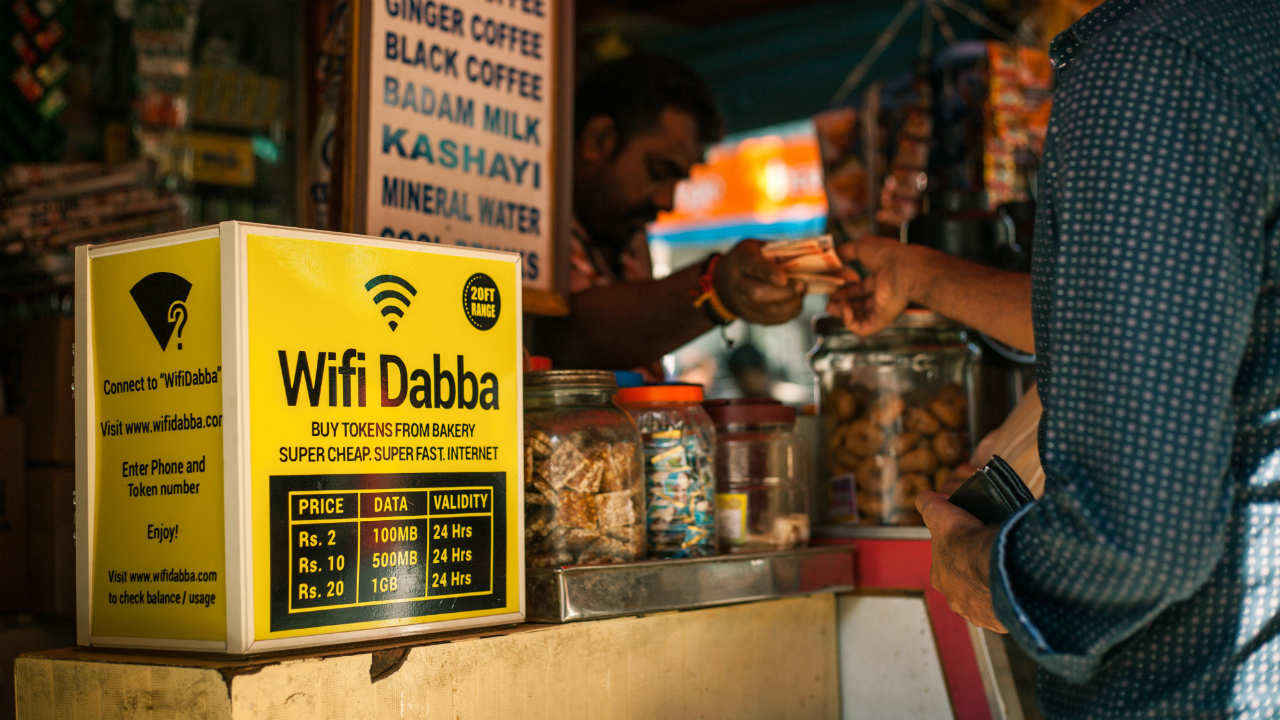


The executive said that Wi-Fi Dabba is now getting a lot of partnership requests and it is now exploring providing its entire technology stack to entrepreneurs. Starting operations in 2017, Wi-Fi Dabba started selling sachet-sized high speed internet at tea stalls across Karnataka. In 2018, it expanded its network to serve co-living segment, followed by the commercial deployment of Supernodes as an underground fiber replacement in 2019.


"Middle and last mile was a challenge. For the middle-mile, ISPs were not able to serve customers. We sorted out our technology and this year we have a big roll-out plan," Sharma said. A few big telcos had also approached the startup for an acquisition, Sharma said, adding, “we had declined offers because we want to reach a sizeable scale first. It is now the right to get acquired.”
 B.Sc.Full Chemistry Syllabus Semester-(I to VI)

B.Sc.Full Chemistry Syllabus Semester-(I to VI)

SEMESTER – II (Total Marks 50, Credit 6)
CHEMG 0201: Elementary Physical Chemistry & Organic Chemistry (Core)
Marks 50, Credit 4
[N.B.: Core -II for B.Sc. Course with Chemistry & GE-II for Honours course (Except Chemistry Honours)]

Unit-I: Kinetic Theory of Gases                                                                                                                    (8 L)
Ideal gas equation, derivation of gas laws, Maxwell’s speed and energy distribution (derivation excluded); distribution of curves; different types of speeds and their significance, concept of equipartition principle, Van Dar Wall equation, Virial equation, continuity of state, Boyel temperature, critical constants, specific heats &specific ratios, laws of partial pressure, vapour and density method of determination molecular weights, limiting density, abnormal vapour density, frequency of binary collisions; mean free path.

Unit-II: thermodynamics                                                                                                                            (12 L)
Criteria Thermal equilibrium and Zeroth law, First law, reversible and irreversible work, of perfect gas, isothermal and adiabatic expressions, Joule-Thomson (derivation excluded); Thermochemistry: Hess’s law and its application.
Second law and its elementary interpretation, Carnot’s cycle and theorems, clausius inequality, criteria of spontaneity, free energy and entropy.

Unit-III: Stereochemistry                                                                                                                            (20 L)
Concept of constitution, configuration and conformation, chirality and chiral Centre, optical activity, optical rotation, specific rotation, optical purity enantiomerism diastereomerism, optical isomerism of lactic acid and tartaric acid. D,L and R,S nomenclature:
Geometrical isomerism reference fumaric acid and malic acid; cis-trans and E,Z nomenclature.
Conformational analysis of ethane.


CHEMG 0202: organic qualitative practical (Lab)                                                           Marks 50, Credit 2
Detection of elements (N, S, Cl) and any one of the following group in organic compounds (solid only):-

NH2, -NO2, -CONH2, -OH, >C=O, -CHO, -COOH

                                                               Download Full ChemistrySyllabus
कंप्यूटर में सेव किये हुए Wi-Fi के पासवर्ड को कैसे जानें ?

कंप्यूटर में सेव किये हुए Wi-Fi के पासवर्ड को कैसे जानें ?

कंप्यूटर में सेव किये हुए Wi-Fi के पासवर्ड को कैसे जानें
कई बार लॉग इन करने के बाद भी अगर आपको अपने Wi-Fi राऊटर का पासवर्ड याद नहीं रहा है तो उसके लिए कुछ आसान ट्रिक्स का इस्तमाल किया जा सकता है आपके Wi-Fi राऊटर में जो भी पासवर्ड दिया हुआ है वो कुछ स्टेप्स फोलो करके वापस देखा जा सकता है| पासवर्ड नार्मल फोर्मेट में दिखेगा जिसे उसर्स पढ़ सकें अपना Wi-Fi पासवर्ड देखने के लिए फ़ॉलो करें ये स्टेप्स-
स्टेप 1:-

·         Users अपने कंप्यूटर या लैपटॉप के कंट्रोल पैनल में जायें
·         Start > Control Panel > Network and Sharing Center
·         नेटवर्क एंड शेअरिंग सेंटर पर सभी वायरलेस और वायर्ड नेटवर्क्स की लिस्ट दी होती है जिनके जरिये सिस्टम में इन्टरनेट एक्सेस किया जाता है|
अगर आप windows 8 का इस्तेमाल कर रहे हैं तो ‘’windows key + c’’

इस शॉर्टकट को एकसाथ क्लिक करें| इसके बाद ‘’search’’ पर क्लिक करें और ‘’Network and Sharing Center’’ ढूंढे|

नोट : ये स्टेप्स पर्सनल Wi-Fi के लिए है| अगर आप किसी ऑफिस के नेटवर्क या किसी अन्य यूजर के Wi-Fi का पासवर्ड देखने कि कोशिश करेंगे तो ये कम नहीं करेगा|
स्टेप 2:-

·         ‘’Network and Sharing Center’’ पर जाकर ‘’change adapter settings’’ नाम के आप्शन पर क्लिक करें

·         अब इस स्टेप में जिस भी Wi-Fi कनेक्शन का इस्तमाल आप कर रहे हैं उसे सेलेक्ट कर राईट क्किच्क करें| इसके बाद ‘‘स्टेटस’’ आप्शन पर क्लिक करें|

·         स्टेटस आप्शन में जाकर “wireless प्रॉपर्टीजपर क्लिक करें

·         ऐसा करने के बाद users के सामने के विंडो खुलेगी| इस विंडो में दो टैब्स दिए होंगे| एक “connections” और दूसरा “security”. यंहा security टैब पर क्लिक करें|

·         अब यूजर्स के सामने तिन आप्शन आयेंगे| इनमे security type, encryptions type और network security key शामिल होंगे| network security वाले आप्शन में पासवर्ड कि जगह “*” दिखेंगे| निचे एक चेक बॉक्स दिया होगा जिसमे “show characters” लिखा होगा| इस चेक बॉक्स पर क्लिक करते ही आप के Wi-Fi का पासवर्ड दिखने लगेगा|